Getting Started
Set up and run the Booltools SEO Crawler locally in a few minutes.
Prerequisites
- Go 1.21 or later
- Node.js 22 or later (for the frontend)
- npm (comes with Node.js)
Installation
1. Clone the repository
git clone https://github.com/booltools/booltools-seo-crawler.git
cd booltools-seo-crawler
2. Install Go dependencies
go mod tidy3. Install frontend dependencies
cd web
npm install
cd ..
Running in Development
Start the backend
make dev
# or: go run ./cmd/server
The API server starts at http://localhost:8080.
Start the frontend
cd web
npm run dev
The web interface is available at http://localhost:4321.
Building for Production
Build the backend
make build
# Binary output: bin/booltools-seo-crawler
Build the SDK CLI
make build-sdk
# Binary output: bin/seo-crawler
Build the frontend
cd web
npm run build
Docker Deployment
docker compose up --build
The app will be available at http://localhost:4321 with
the API at http://localhost:8080.
Running Tests
make test
# or: go test ./... -v -count=1
Development Commands
| Command | Description |
|---|---|
make build |
Build backend binary |
make build-sdk |
Build SDK CLI |
make build-all |
Build both |
make dev |
Run backend (dev mode) |
make test |
Run all tests |
make lint |
Run go vet |
make tidy |
Run go mod tidy |
make web-dev |
Start frontend dev server |
make web-build |
Build frontend for production |
make clean |
Remove build artifacts |
Windows: install Make with
winget install GnuWin32.Make
Troubleshooting
- Port 8080 already in use
-
Another process is using port 8080. Stop it or set the
PORTenvironment variable to use a different port. - Node.js version error during frontend build
-
Astro requires Node.js 22 or later. Run
node --versionto check and update if needed usingnvm install 22. - Go module download fails
-
Ensure you have internet access and Go 1.21+ installed. Run
go versionto verify. If behind a proxy, setGOPROXYappropriately.
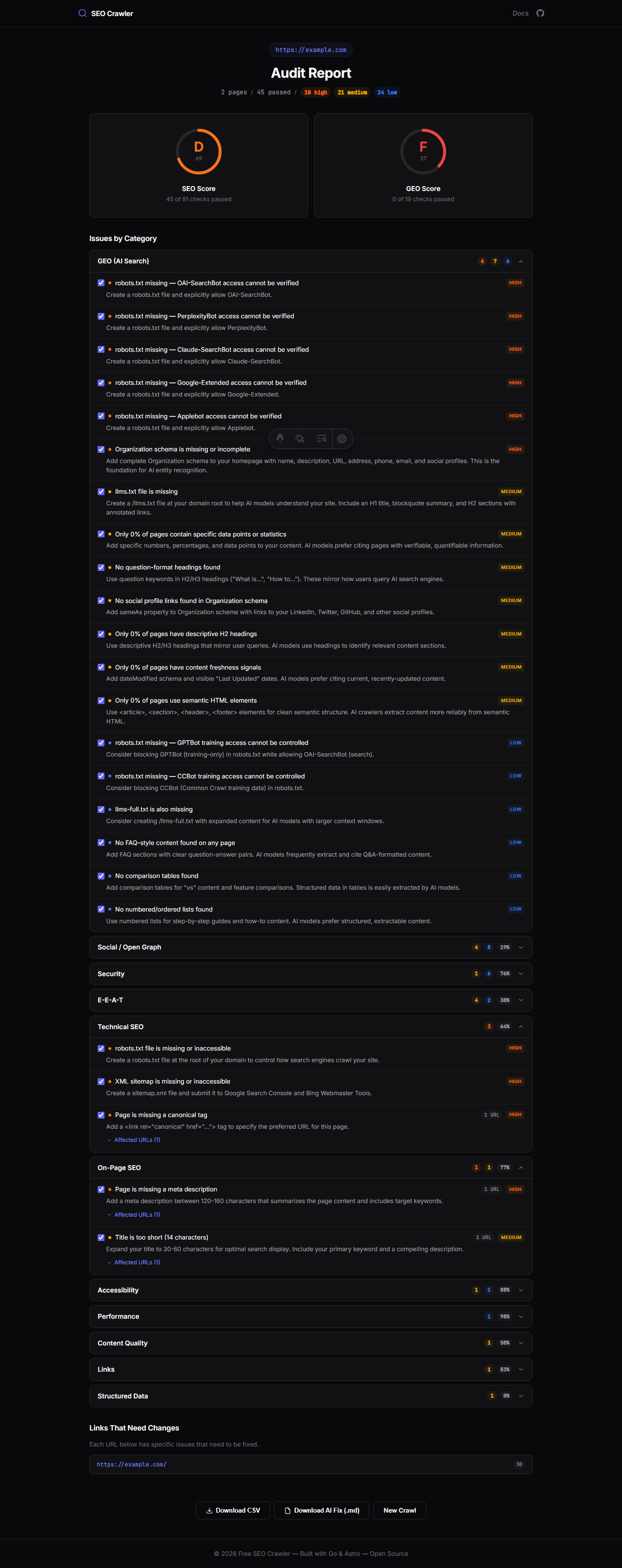
What You'll See
After running an analysis, you'll get a comprehensive report like this:
Next Steps
Once running, try analyzing localhost:4321 from the web
interface to audit the crawler's own frontend. Then explore the
CI/CD SDK documentation to integrate SEO checks
into your deployment pipeline, or browse the
Rules Reference to understand what each of
the 130+ rules checks.